

Version 2.17
VertiTab v2.17 introduces comprehensive search functionality supporting multiple sources (tabs, history, bookmarks) and search engines. Search bar integrates AI chat with ChatGPT, Claude, Gemini, DeepSeek support. Adds auto-activate tab grouping and unified window menus.
v2.17Innehåller 8 versionsuppdateringar
v2.17.8
2025-03-23Changed
- Adjusted grouping style to be closer to Edge style, adding indents and borders to tabs in groups to better distinguish whether tabs are grouped or ungrouped.
Fixed
- Keepalive tabs would still be discarded by the browser even if set not to be discarded automatically. Modified to automatically reload when discard is detected.
v2.17.7
2025-03-19Added
- Added window header display option. When enabled, shows window header with tab and group counts for the current window.
- Added F2 keyboard shortcut to rename tab titles.
Changed
- Disabled tab preview functionality when hover menu appears during drag and drop operations.
- Modified page sidebar tab management to be fully functional.
Fixed
- Fixed white background flash issue when opening side panel in dark mode.
- Fixed tab title rename dialog to show modified title instead of original title.
- Fixed incorrect tab positioning when using Move Tab option from hover menu.
v2.17.6
2025-03-17Added
- Added many new keyboard shortcuts.
- Added a setting for drag-hover menu delay, allowing users to adjust the delay of the drag-hover menu. Setting it to 0 disables the drag-hover menu.
- Added "Discard All Tabs" and "Reload All Tabs" menu options for tab groups.
Improved
- Refactored drag-and-drop sorting, adding indicators and background colors.
- Improved snapshot restoration process with detailed progress notifications.
- Tab groups no longer update in real-time but refresh after completion.
- Enhanced tab tree closing functionality and improved tooltips.
- Batch operation menu prompts now allow users to opt out of future prompts.
Fixed
- Fixed the collapse behavior of tab groups when the "Disabled" setting is enabled.
- Fixed an issue where automatic tab discard was not working.
Removed
- Removed translations for en-US, en-GB, and en-AU, keeping only en.
- Removed translation for es-419, keeping only es.
- Removed translations for pt-BR and pt-PT, keeping only pt.
- Removed translations for ar, fi, hi, hr, and sl.
v2.17.5
2025-03-10Added
- Enhanced tab selection functionality: Added Shift+W shortcut to close all selected tabs.
- Options page - Tree-style tabs: Added new option [Close entire tree when closing parent tab].
- When display mode is tree-style tabs, click close button to close single tab, right-click to close tab tree.
- Added settings dialog to toggle box selection, allowing users to disable box selection feature.
Changed
- Optimized tab grouping functionality: Added option to ignore www prefix, improved domain grouping format options, enhanced group preview display.
- Optimized bottom navigation - More - Group by website menu: Supports more options (Full domain, Main domain, Domain without suffix, Custom combinations), supports quick launch of [Auto Activate Tab Grouping], supports preview of different grouping options.
- Optimized menu [Add tab to group]: Added [Group by website] (premium feature).
- Added dotted border to discarded tab icons (consistent with browser behavior).
- Refactored page sidebar related code and introduced sidebar trigger area and position settings.
- Updated localization files: Improved translation consistency across all supported languages.
Fixed
- Fixed visual flickering issue caused by conflict between tab switching and selection mode.
- Added compatibility testing and optimization for Opera browser.
v2.17.4
2025-03-06Improved
- Refactored tab auto-discard/close management and timer mechanism to optimize memory and performance. Provides more granular tab timer control and optimized tab discard and close strategies.
- Added more compatibility testing and optimization for Opera browser.
Fixed
- Fixed issue with copying tab tree information.
- Fixed dialog loss when adding multiple tabs to bookmarks.
- Fixed tab lens not displaying when page contains iframes.
- Fixed incorrect tab switching when clicking sidebar tabs in Opera GX workspaces.
v2.17.3
2025-03-01Added

- Support AI-powered intelligent grouping for selected tabs.
Fixed
- Search results page adjustments: Adjusted background and text styles.
- Added missing translations for Auto Activate Tab Grouping Name.
v2.17.1
2025-02-27Added
- Enhanced unified window menu for tab operations:
- Added "Copy Tab" menu, supporting copying tabs to current window, new window, private window, other existing windows (with active tab preview).
- Added "Batch Copy Tabs" feature, supporting the same window options.
- Added "Move Tab to Other Window" menu, supporting moving tabs to new window, private window, other existing windows (with active tab preview).
- Added "Batch Move Tabs to Other Window" feature, supporting the same window options.
- Added right-click menu for search result items.
- Enhanced bookmark functionality:
- Added single tab bookmark option in tab right-click menu.
- Added ability to create new bookmark folders directly in bookmark dialog.
- Added options to add multiple tabs as subfolders or directly to folders (premium feature).
- Added ability to bookmark tab groups, using group name as folder name by default (premium feature).
Improved
- Preloading of recently closed tabs.
- Optimized multi-line display in search box.
- Optimized tab menu display in Vivaldi browser.
Fixed
- Fixed issue where tab history was not updating correctly.
- Fixed incorrect tab avatar display when URL changes.
- Fixed non-functional right-click menu for search result tabs.
Removed
- Removed "Move Tab to Other Window" menu (merged into "Move Tab to New Window").
v2.17.0
2025-02-26Added
- Comprehensive Search Functionality:
- Supports multi-source searching (open tabs, recently closed tabs, history, bookmarks, reading list)
- Supports multiple search engines (Google, Bing, Yahoo, Baidu, Yandex, DuckDuckGo, Ask)
- Supports @ commands for quick search source switching
- Supports custom management and sorting of search sources
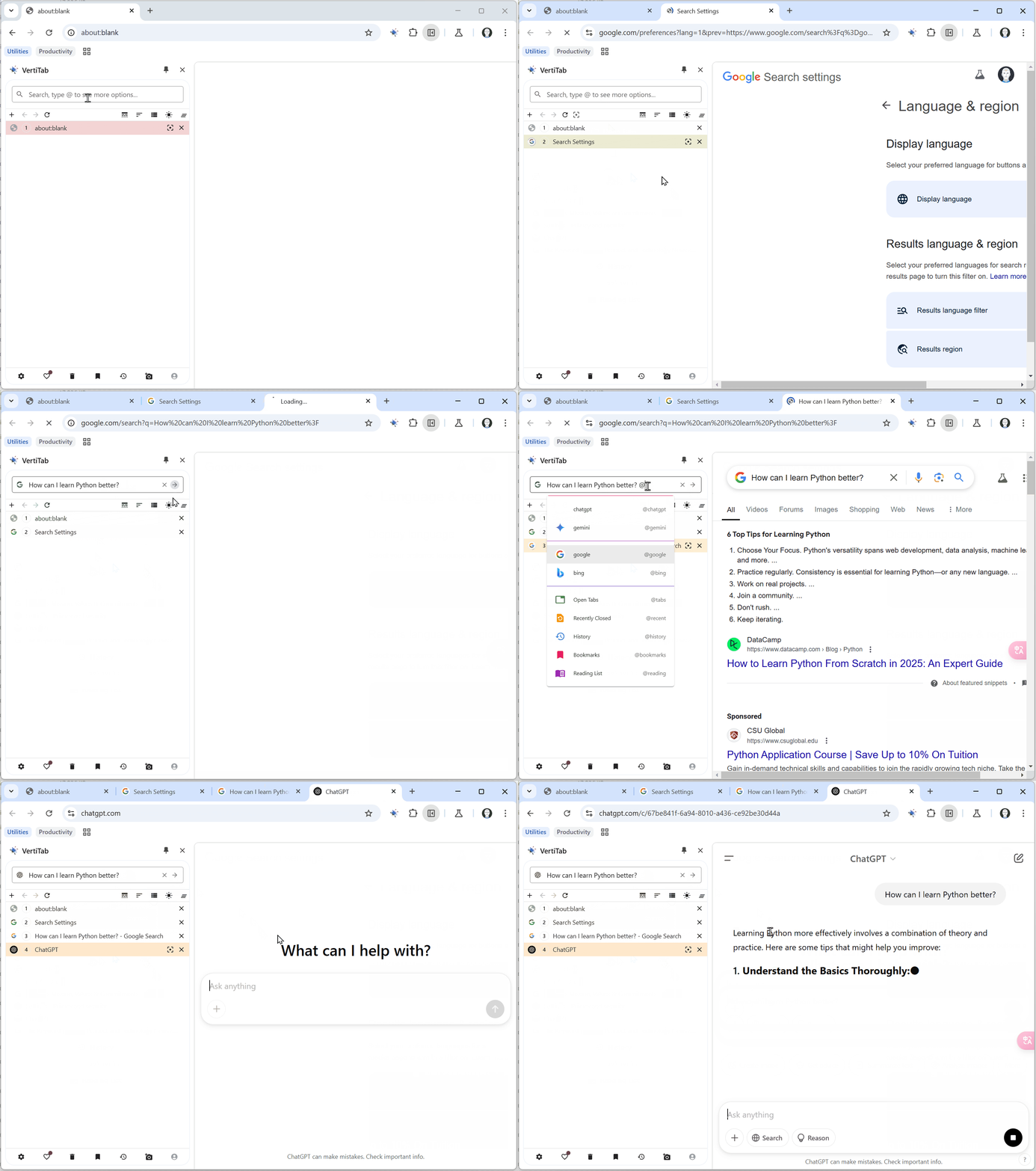
- AI Chat Integration in Search Bar:
- After entering content in the search bar, can open target website and automatically fill chat dialog and submit query
- Default support for mainstream AI conversation models including ChatGPT, Claude, Gemini, DeepSeek
- Supports adding, editing, deleting, and sorting model selections
- Automatic Tab Grouping: Introduces flexible domain name format options: main domain, subdomain, domain prefix, domain without suffix, and custom combinations.
Changed
- Tab Tree Processing Optimization: Adds circular reference detection and automatic repair mechanism, optimizes parent-child tab relationship processing.
- Recently Closed Tabs Improvements: Changes default retention time from 1 day to 30 days, increases count limit from 100 to 5000, optimizes history synchronization mechanism, restores tab history records when restoring from recently closed tabs.
- TabLens Functionality Optimization: Optimizes monitored elements performance, allows free users to save configurations (with limit of 1 per site).
Fixed
- Fixed issue where current tab's close button doesn't display on hover.
- Fixed issue where icons can't display normally due to faviconkit rate limiting.
- Fixed duplicate UUID issue in quick access list.
- Improved empty title tab handling logic.
- Resolved circular reference issue in tab tree.
- Fixed tab metadata cache synchronization issue.
Removed
- Removed auto-create/join same domain name group feature (replaced by automatic tab grouping).