

Versão 3.6
VertiTab v3.6 brings Bookmark Cloud Sync with Merkle-CRDT conflict resolution, full Bookmark Snapshots with restore and compare tools, Lock Tab protection, advanced tab group operations, accessibility color modes, and developer-friendly debug workflows.
VertiTab v3.6 — Cloud Sync, Snapshots, and Safer Tab Control
VertiTab v3.6 introduces a major upgrade for bookmark reliability and cross-device workflows. With Bookmark Cloud Sync built on a Merkle-CRDT architecture, your bookmarks stay consistent across devices with deterministic conflict resolution and built-in safety checks. This release also adds full Bookmark Snapshots for backup, compare, and restore, plus new controls for tab safety, group operations, accessibility, and debugging.
v3.6.0
2026-04-21Added
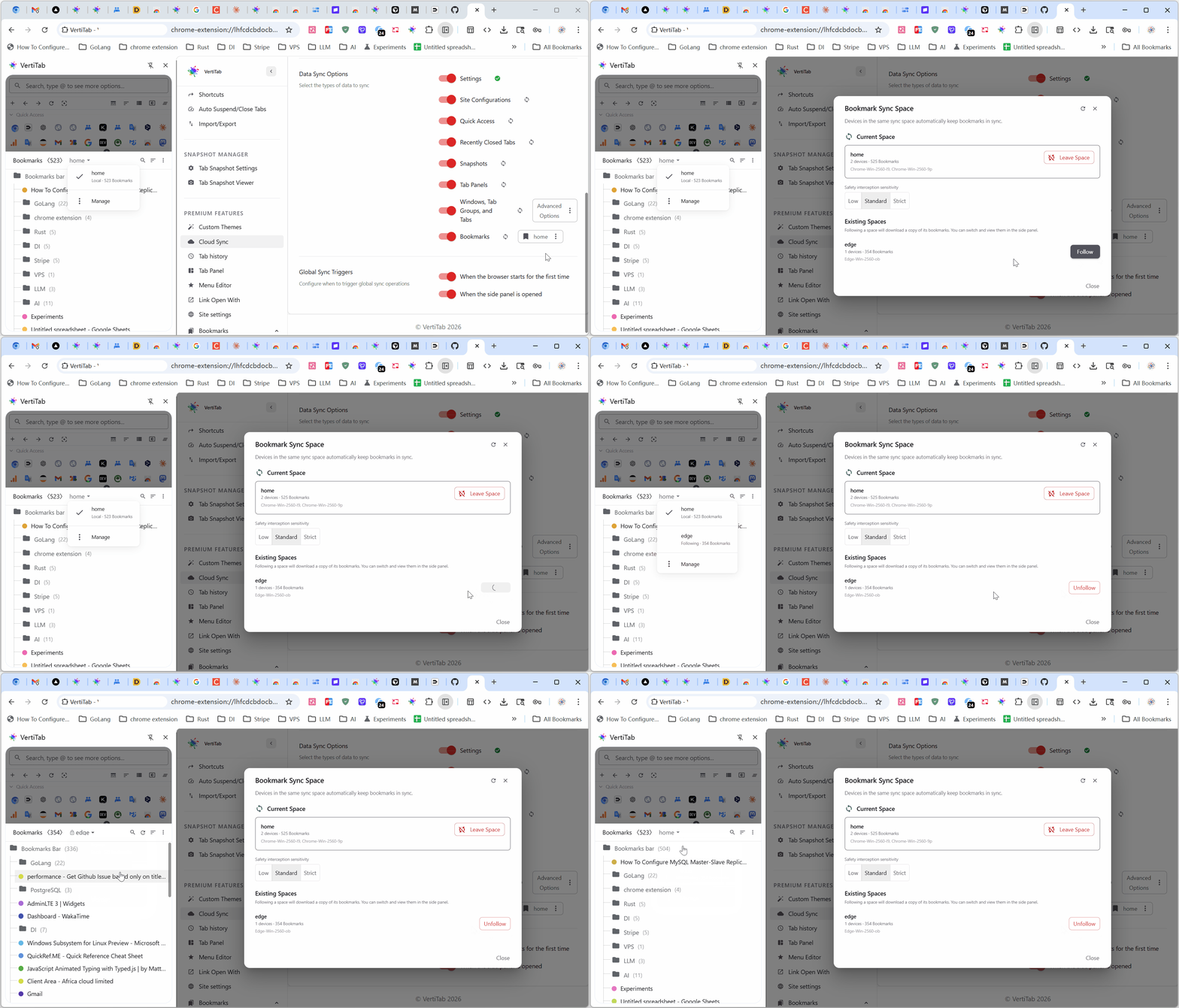
- Bookmark Cloud Sync — Multi-device bookmark management and cloud synchronization based on sync spaces, powered by Merkle-CRDT architecture for deterministic conflict resolution and zero data loss.
- Create, join, or leave a sync space to link multiple devices for automatic bookmark synchronization.
- Preview how local bookmarks will merge with cloud data before joining, with three merge strategies.
- Built-in safety protection: detects large-scale bookmark changes (deletions or additions) during sync and prompts you to choose how to proceed.
- Browse bookmarks from other sync spaces in the side panel without affecting your local bookmarks.
- Real-time sync progress and status indicators in the side panel and sync settings page.
- Bookmark Snapshots — Full bookmark backup and time-travel recovery, never lose a bookmark again.
- Create manual backups, view bookmark trees, compare with current bookmarks (with diff highlighting), and one-click restore directly from the viewer.
- Auto-snapshot before cloud sync and on bookmark changes, with smart content-based deduplication to save storage.
- Scheduled snapshots at fixed intervals (every 6h, 12h, daily, or weekly).
- Import and export bookmark snapshots in HTML (Netscape) or JSON format.
- Fine-grained snapshot settings: auto-snapshot toggle, maximum retention count, minimum change threshold, and scheduled interval.
- Lock Tab — Pin a tab to its current URL: close attempts now ask for confirmation, links always open in a new tab, and navigation away is automatically reverted. A lightweight "Prevent accidental close" option is also available in per-site settings.
- Close tabs in the current group — New right-click submenu for grouped tabs: close other/above/below tabs, or close tabs sharing the same hostname or root domain — all scoped to the current group only.
- Color-blind / color-weak mode — Applies an accessibility-friendly Okabe-Ito palette to tab group colors, plus a dedicated color-blind theme.
- Custom tab group colors — Override any Chrome tab group color with your own hex value, configured separately for light and dark mode, with live preview.
- Merge groups — Combine several tab groups into one from the group right-click menu: pick a target name and color, select the groups to merge, and quickly copy name/color from any group via hover buttons.
- Auto-collapse inactive groups — Automatically collapse a tab group after a configurable idle time. Configure globally in settings, or per-group via the right-click menu with an option to promote that value as the new global default.
- Debug mode — Mark tabs or whole sites as "in development". A debug icon appears on these tabs; clicking it clears the configured site data and then performs a hard reload. You can exclude specific cookies (including cross-domain auth/SSO cookies) from being wiped.
- Saved tab URL — Remember any tab's URL, edit it later, and return to it in one click, even if the page has since navigated elsewhere.
Experimente o VertiTab gratuitamente
Disponível para Chrome, Edge, Firefox e outros navegadores Chromium como Brave e Vivaldi.
 Chrome Web Store
 Edge Add-ons
 Firefox Add-ons