


ChangeLog
VertiTab - Complete changelog for vertical tabs in the side panel. See the latest features, improvements and bug fixes.
About Changelog
All notable changes to this project will be documented in this file.
This changelog will be updated according to the development progress. The date following the version is the date it was submitted to the Web Store, not the release date in the app stores (review times vary between app stores, with the Edge Add-ons store review potentially taking up to a week).
You can find the latest version in the Chrome Web Store, the Edge Add-ons Store, or the Firefox Add-ons Store.
We have launched a new user guide: https://www.rabbitpair.com/products/vertitab
VertiTab v3.7 Changelog: Browser Right-Click Menu for Tab Management
VertiTab v3.7 adds a full-featured right-click menu for tab management directly in the browser's native context menu. Suspend, close, group, sort, snapshot, and more — all from a right-click, no side panel needed. Supports page, tab (Chrome 150+), frame, link, and extension icon contexts.
v3.7.12
2026-08-22Added
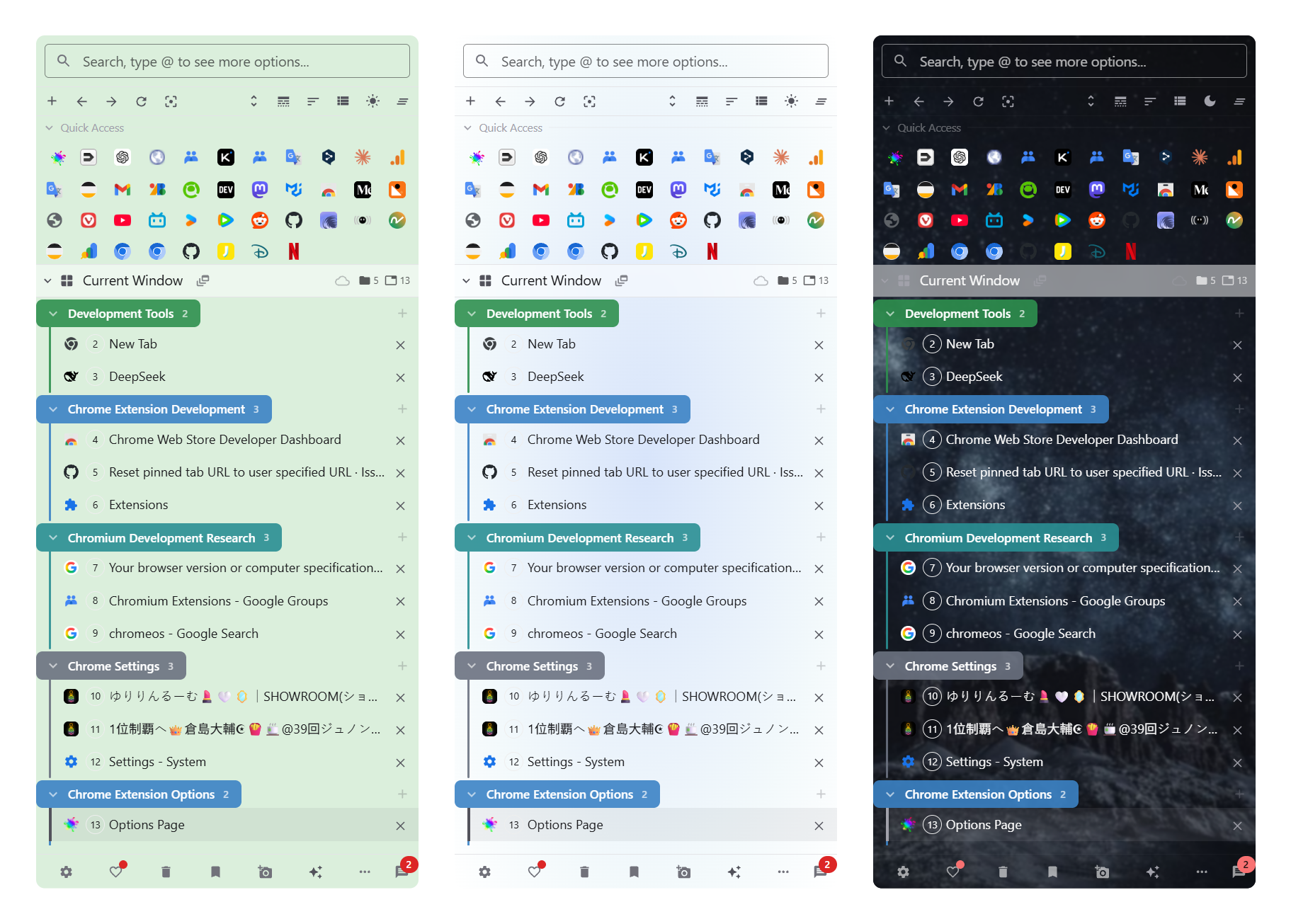
- Custom Theme Quick Setup now includes background settings — easily set a custom background color, gradient, or image for the sidebar.
Improved
- AI Assistant now automatically updates available models and prevents outdated data from overwriting your configuration after cloud sync.
- Significantly improved window state restoration — window names, icons, cloud sync associations, and tab metadata are more reliably restored after browser restart. Cloud-synced windows can also be re-associated when restored via Ctrl+Shift+T.
- Added editable reset URL for pinned tabs — click the edit icon to customize the URL a pinned tab resets to.
- Window styles (custom names, icons, colors) are now included in Import/Export.
- Search results now group matched tabs under their tab group header, matching the sidebar's visual style.
- Added tool definition viewer in AI Assistant settings — view function names, parameters, and descriptions in an API-doc style dialog.
Fixed
- Fixed tabs potentially falling out of groups when "New tab next to active" or tree-mode sorting moved grouped tabs.
- Fixed scroll to active tab not working for newly created tabs.
- Fixed multiple window header display issues including text/stats overlapping when icons or fonts are enlarged, WindowSwitcher not showing custom icons and colors, and sticky header text overlap when scrolling.
v3.7.11
2026-08-14Added
- Cloud windows now open in a dedicated tab panel when Tab Panels mode is enabled.
- Opening or linking cloud windows now provides restore options and merge strategy selection.
Improved
- Cloud window restoration is now smoother with progressive tab loading and real-time progress feedback.
- Window switcher uses expand/collapse interaction with window icons for a cleaner experience.
Fixed
- Fixed active tab state confusion when tiling multiple windows in the side panel.
- Fixed sticky window header text overlap when scrolling the tab list.
- Fixed cloud windows not appearing in the window switcher after closing a synced window.
- Fixed cloud window restore not suspending tabs when lazy loading is enabled.
v3.7.10
2026-08-10Added
- Window Sync (Pro): keep your browser windows in sync across multiple devices via cloud (Settings → Cloud Sync → Window Sync).
- Create synced windows and link them to local windows — tabs and groups stay synchronized automatically.
- Browse and manage cloud windows from other devices in the Window Switcher (view, open, link, delete).
- Smart merge with conflict resolution, large-scale change protection, and configurable protection for pinned/active tabs.
- Sync results toast with undo support, last sync time in tooltip, and automatic disconnection notification.
- Optional periodic polling to detect remote changes on idle devices (disabled by default).
- Manage synced windows from the website account profile.
- Rule-based auto tab grouping: define URL patterns (wildcard or regex) to automatically assign tabs to groups, with strict mode to remove tabs when URLs no longer match and a URL test tool to verify rules before saving (Pro, Settings → Tab Groups → Rule-Based Grouping).
- "Pin window headers" option to pin each window header at the top while scrolling through its tabs (Settings → Multi-Window → Appearance).
- AI Assistant tools for window styles: query, search, create, update, and delete window style presets via the AI assistant.
- "Enable custom list style" toggle in List Style settings.
- "Close side panel in browser fullscreen (F11)" option.
- "Show tab count on extension icon" option that displays the current window's tab count as a badge on the toolbar icon (Settings → Appearance).
- Conflict hints in Tab Group settings when mutually exclusive options are enabled.
Improved
- Simplified cloud sync status display from separate upload/download indicators to a single status chip.
- Improved recently closed tabs sync performance and reliability when syncing large numbers of records (up to 5000).
Fixed
- Fixed custom window names not being synced across devices when using cloud snapshot sync.
- Fixed pinned tabs being incorrectly removed or duplicated across windows when "Show all windows" and "Share pinned tabs across windows" are both enabled.
- Fixed theme settings (font, vertical margins, etc.) reverting to defaults after leaving the theme settings page.
- Fixed current window highlight not working in Tree view mode.
- Fixed side panel being unreadable in Wavebox browser.
- Significantly improved Tab Panels reliability after browser restart — panels no longer lose their tabs when Chrome reassigns tab IDs on restart.
v3.7.8
2026-07-22Added
- Show popup and standalone app windows in the side panel (Settings → Multi-Window → Show popup and app windows).
- Window Switcher popup: quickly switch between named windows via extension icon action (Settings → Appearance) or keyboard shortcut.
- Iconify icon search: browse and select from 200,000+ open-source icons in window, tab, panel, and menu icon pickers.
- Unified icon picker: all icon selection dialogs now support MUI icons, emoji, and Iconify search with random and clear buttons.
- Quick skill access button (⚡) in AI chat input bar for fast skill template selection with search.
Changed
- "Mute All Tabs" now opens an interactive panel listing all audible tabs with individual mute/close controls and a global mute toggle.
- Redesigned bookmark sync space management: added "Quick Start" one-click space creation; replaced comparison table with intuitive Join vs Follow cards; unified compact space list; added collapsible "Manage other spaces" section.
Fixed
- Fixed AI skill creation not allowing choice between Ask and Agent skill types.
- Fixed snapshot viewer ERR_FILE_NOT_FOUND error when opening synced snapshots.
- Fixed bookmark sync "Join Space" and "Create Space" silently failing without bookmark permission.
- Fixed missing toast notification when user denies bookmark permission request.
- Fixed window style presets with long names hiding edit/delete buttons.
- Fixed popup and app windows incorrectly appearing in the side panel tab list.
- Window "Add to Bookmarks" now uses the custom window name as bookmark folder name.
- Fixed pinning a tab creating duplicate pinned tabs when "Share Pinned Tabs Across Windows" was enabled.
- Fixed tab panels appearing blank after browser restart.
v3.7.6
2026-07-05Fixed
- Fixed AI Assistant errors when using Gemini models with Agent skills or browser tools.
- Switching between different AI models (Gemini, Claude, GPT) within the same conversation now works reliably, including conversations with tool calls.
- Fixed Claude models failing when a task required multiple tool calls.
v3.7.5
2026-07-04Added
- Tree-Style Tabs: connector lines are back as an optional setting — enable them under Settings → Tabs → Tree-Style Tabs, with adjustable width, style, color, and opacity.
- AI Assistant: new "Rebuild Tab Tree" skill that analyzes your open tabs and organizes them into a logical tree, with tools that can read and reorganize tab parent-child relationships in the current window.
Changed
- When the side panel is too narrow, the AI Assistant now opens in a compact popup window instead of a new tab.
Fixed
- Fixed AI Assistant becoming unusable after upgrading (invalid request address and disabled tools) — configurations now repair themselves automatically, no manual reset required.
- Window names and Quick Access changes made by AI skills now appear in the side panel immediately, without reopening it.
- Resetting Tree-Style Tabs settings now reliably resets every option.
v3.7.4
2026-07-03Added
- AI Assistant: 100+ skills covering writing, research, learning, development, and more. Supports web search, image generation, and thinking process display.
- AI Assistant: New browser automation skills — manage tabs, bookmarks, snapshots, and Quick Access through natural language.
- Quick setup AI providers with preset configurations and auto-detect available models.
- "Ask AI Assistant" option in the tab context menu.
- Option to close tabs after bookmarking.
Changed
- Redesigned AI Skills system with category browsing, featured recommendations, and ASK/Agent mode separation.
- Redesigned AI model configuration and provider management.
- Redesigned setup wizard with streamlined steps and premium feature discovery.
- Site-specific settings are now a Pro feature.
Fixed
- Improved AI conversation reliability, error handling, and multi-language support.
- Fixed side panel auto-scroll, tab tools, and context menu issues.
v3.7.3
2026-06-25Added
- New appearance option to automatically close the side panel when a web page or video goes fullscreen, for a distraction-free viewing experience.
Fixed
- Fixed bookmark sync for large libraries — spaces with thousands of bookmarks now sync to the cloud reliably.
- The bookmark count shown for a device now reflects what actually synced, and any sync that can't complete is clearly reported instead of appearing to succeed.
- Smart Assignment works again — newly opened tabs are automatically moved to their matching window by URL rule, and that window is brought to the front.
v3.7.2
2026-06-11Added
- List Style (Pro) — A new settings page to fine-tune how list items look across Tabs, Bookmarks, Quick Access, History, Recently Closed, Reading List, Search Results, and Tab History. Adjust icon size and shape, title font size, weight, and number of lines, and subtitle font size and opacity — globally or per feature — with instant preview in the side panel. Your existing bookmark font size, bookmark icon size, and tab title line settings move here automatically.
- The bookmark space switcher in the side panel is now always visible: view followed spaces without joining one, search inside a followed space, and local bookmark search also surfaces matches from followed spaces. Users without followed spaces see a quick path to Cloud Sync settings.
Changed
- The multi-select checkbox is now larger and easier to click.
- More tab, appearance, keyboard shortcut, and snapshot settings can now be found through the settings search.
- Redesigned the Keyboard Shortcuts page with cleaner cards and a clearer layout: newer shortcuts now appear under their proper categories instead of "Other", unassigned shortcuts show a "Not set" label, and opening the browser's shortcut settings highlights the matching shortcut for easier editing.
- Tab snapshots are now more generous: you can keep many more snapshots, and both the auto and manual snapshot limits are adjustable by everyone (pinned and locked snapshots no longer count toward the manual limit). The auto-snapshot trigger options (minimum tab count and tab difference threshold) and the ignore-URL list (to keep chosen pages out of snapshots) are also available to everyone, and the startup snapshot reminder description was rewritten to match how it actually works.
- Redesigned the Cloud Sync settings page: every sync option now explains what it syncs, when it helps, and how data from multiple devices is merged, with a cleaner and more consistent layout.
- Renamed the "Snapshots" sync option to "Tab Snapshots" and "Windows, Tab Groups and Tabs" to "Open Windows & Tabs" to avoid confusion.
- Bookmark sync now always reports its result — including "already up to date" when nothing changed.
- Restoring a bookmark snapshot while in a sync space now warns that the restored changes will automatically sync to the cloud and your other devices.
Fixed
- Completed missing interface translations across several languages.
- Some keyboard shortcuts were missing a description or showed a raw text label; their descriptions now display correctly in all languages.
- The "Collapse or Expand All Groups" and "Collapse or Expand Other Groups" shortcuts can now collapse groups again — previously they could only expand them.
- The "Discard Tab Tree" and "Reload Tab Tree" shortcuts now apply to every nested tab, not just the immediate child tabs.
- On the Performance page, the Auto Close "protect recent tabs" count and inactivity time can now be set to 0 — previously the value would snap back.
- Creating a snapshot from the browser right-click menu now respects your snapshot limit, and reaching the limit shows a clear prompt with quick links to view snapshots or open settings.
- Reinstalling the extension and rejoining the same sync space no longer rewrites your bookmark tree — identical bookmarks now merge with zero changes (previously hundreds of additions and deletions could be reported).
- Bookmark counts shown in the merge preview and the side panel now match.
- The side panel bookmarks header now shows the sync space's display name and a live sync status indicator while bookmark sync runs.
- Unfollowing a space from settings while viewing its bookmarks in the side panel now correctly switches back to local bookmarks, and followed spaces that no longer exist on the server can still be unfollowed.
- Cloud sync errors now show clear, translated messages instead of raw English text or no feedback at all.
- Members on auto-renewing subscriptions no longer see incorrect "membership expiring soon" countdown reminders — only trial and fixed-term memberships that truly expire are reminded.
v3.7.0
2026-05-28Added
✦ Browser Right-Click Menu — Manage Tabs Without Opening the Side Panel
Access tab management features directly from the browser's native right-click menu. Right-click a tab, a page, a link, or the extension icon to suspend, close, group, sort, snapshot, and more — zero screen space consumed.
- Suspend tabs — Suspend current, other, all, by hostname/domain, inactive, or other-window tabs. Shows live tab counts for same-site items.
- Close & cleanup — Close tabs above, close duplicates, close all hibernated, close by hostname/domain, and batch-clear by condition.
- Reload — Hard reload (bypass cache), batch reload all/other/same-site/hibernated tabs.
- Duplicate & move — Duplicate to new window or incognito, move to incognito, move tab or group to start/end.
- Sort — One-click sort by domain A-Z/Z-A, URL, or last access time.
- Group — Group by domain, AI smart grouping, ungroup all, merge groups.
- Snapshots — Create snapshot, view history, open snapshot settings.
- Tab info — Rename, copy info, generate QR code, view browsing history, schedule tasks.
- Site data — Clear cookies and site data for the current site.
- Quick actions — Mute all playing tabs, switch to last accessed tab, lock current tab.
- Link context — Open links in a popup window from the link right-click menu.
- Extension icon — Quick actions: view snapshots, set sidebar position, toggle page sidebar, tab group operations.
- Tab context (Chrome 150+) — All tab management actions available directly in the tab strip right-click menu.
See the full guide to right-click menu tab management →
✦ Split View — Side-by-Side Window Tiling
Arrange tabs into tiled windows for focused multitasking. Available from the tab right-click menu, the side panel tab menu, and the browser context menu.
- Single-tab split — Right-click any tab to split it side-by-side or top-and-bottom with the current window. The original window keeps its remaining tabs.
- Multi-tab tiling (Premium) — Select 3–4 tabs in the side panel and tile them into custom layouts: three columns, three rows, 2×2 grid, or asymmetric arrangements (1 left + 2 right, 2 left + 1 right).
- Cancel split — Restore all tiled windows back to a single maximized window. Available from the window menu and browser context menu.
- Multi-session support — Run multiple independent split-view sessions across different windows simultaneously.
- Browser context menu — Split View submenu with Side by Side, Top and Bottom, and Cancel Split options right from the page right-click menu.
Due to browser API limitations, split view currently works by creating separate windows. We'll switch to native split once the API becomes available.
✦ Right-Click Menu Settings
Full customization from the VertiTab options page:
- Drag-and-drop reordering of menu items.
- Per-item enable/disable toggles.
- Per-context type toggles: page, tab, frame, link, extension icon.
- One-click reset per section or all menus.
✦ Multi-Select Checkbox Mode
- When enabled, favicons are replaced with checkboxes during multi-tab selection for clearer visual feedback. Configure in Settings > Tabs > Appearance.
✦ Extension Icon Action Expanded
- Extension icon click action now supports two additional options: Tab Snapshots and AI Assistant, alongside the existing side panel, popup, and pop-up window options. Configure in Settings > Appearance.
✦ Smart Highlighted-Tab Detection for AI Grouping
- AI grouping from the browser right-click menu now automatically detects multi-selected (highlighted) tabs and groups only those tabs instead of the entire window.
✦ Content Script Exclusion List
- New "Other Settings" page where you can add domains to exclude from VertiTab's content scripts, resolving conflicts with websites like Google Gemini. Disabled features on excluded domains are clearly listed.
✦ Version Update Notifications
- New version updates now appear as a notification in the message center for better visibility, in addition to the existing changelog badge.
Changed
- The Page Keep Alive helper script is now injected on-demand only when the feature is active, instead of being loaded on every page. This reduces interference with third-party websites.
- When the "Use Pop-up Window" option is enabled (click extension icon), resizing the window now remembers the dimensions.
- Closing tabs to the left or right of the current tab no longer closes pinned tabs — pinned tabs are always skipped.
- Browser right-click menu on tabs (Chrome) now shows descriptive labels like "This Site" and "This Domain" instead of hostnames that may not match the right-clicked tab.
- Each right-click menu popup (AI Grouping, Rename Tab, etc.) now remembers its own window size and position independently.
- AI Grouping dialog now displays real-time progress and stays open until manually closed, allowing you to undo the operation if needed.
Fixed
- Fixed "Close Same Site Tabs" using domain-based matching instead of hostname-based matching, causing incorrect tabs to be closed.
- Fixed settings with valid falsy values (e.g., disabled toggles) being incorrectly reset to defaults.
- Fixed AI Grouping popup from the right-click menu not showing the login prompt for unauthenticated users.
Permissions
- New permission:
contextMenus— enables integration of tab management features into the browser's native right-click menu for quick access without opening the side panel.
v3.7 brings tab management to where you already are — the right-click menu. No panel to open, no screen space consumed. Right-click, act, done.
Try VertiTab for Free
Available on Chrome, Edge, Firefox and other Chromium browsers like Brave and Vivaldi.
 Chrome Web Store
 Edge Add-ons
 Firefox Add-ons