v1.7 Released — AI-Powered Live Captions

DualPiP – Bilingual Subtitle Picture-in-Picture Player

The most powerful PiP player for Chrome & Edge. AI-powered live captions for any video, bilingual subtitles, online subtitle search, gesture controls, learning mode with AB loop — everything you need for multitasking, language learning, and entertainment.


AI Live CaptionsSubtitle Search30+ AI ProvidersLearning Mode
Supports Chrome / Edge / Brave / Vivaldi / Arc
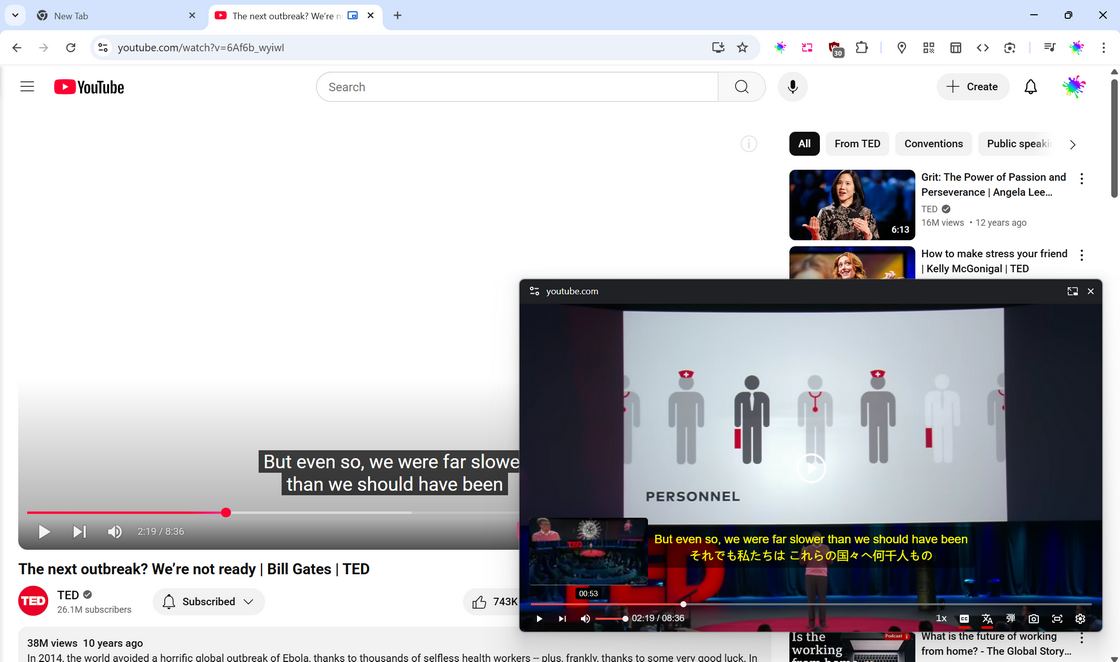
DualPiP bilingual subtitle picture-in-picture player demo

What is DualPiP?

DualPiP is the all-in-one Chrome extension that transforms any web video into an advanced picture-in-picture player with bilingual subtitles, AI-powered live captions, online subtitle search, learning mode, gesture controls, and danmaku. Whether you're multitasking, binge-watching foreign shows, taking online courses, or studying a new language, DualPiP helps you watch smarter and learn faster.

  • One-click PiP for any video site — YouTube, Netflix, Disney+, Bilibili, and 200+ more
  • 🌍AI live captions, bilingual subtitles, subtitle search & download — never miss a word
  • 🎓Learning mode with AB loop, gesture controls, danmaku — built for power users
  • 🔒Privacy-first: runs locally, your data stays on your device

Core Features

🎬
Picture-in-Picture Player
Float videos on top with subtitles, danmaku, and full playback controls — works on YouTube, Netflix, Disney+, Bilibili, and 200+ sites
🌐
Bilingual Subtitle Translation
Display bilingual subtitles in PiP and on web pages. Powered by Google, Microsoft, or 30+ AI engines for immersive language learning
v1.7+
🎙️
AI Live Captions
Generate real-time AI subtitles for any video with Deepgram or local Whisper — even videos without built-in captions get live bilingual subtitles
v1.7+
🔍
Online Subtitle Search
Search and download subtitles from OpenSubtitles, SubDL, and more. Import local SRT/VTT/ASS files. Smart ID detection for accurate matching
📖
Learning Mode
AB loop repeat, multi-sentence selection, smart merge, split & collapsed panel modes — the ultimate tool for language learners
👆
Gesture Controls
Swipe to seek, scroll wheel, long-press speed boost, double-tap, volume/brightness gestures — full touch & mouse control in PiP
v1.7+
AI Translation (30+ Providers)
One-click setup for OpenAI, Claude, Gemini, DeepSeek, Groq, and 30+ providers. Context-aware translation with TMDB movie info for natural results
💬
Danmaku & Live Chat
Display Bilibili danmaku, YouTube/Twitch/Kick live chat as danmaku overlay — bring the community experience into your PiP window
Built for language learners and power video watchers

Unlock DualPiP's Full Potential

Upgrade to DualPiP Player Pro — unlock more platform subtitle support, batch pre-translation, AI translation, and full customization.

Free

Free/forever
  • Picture-in-Picture player — float any video, multitask freely
  • Full playback controls & keyboard shortcuts
  • Bilingual subtitle translation (Google, Microsoft, Yandex)
  • Online subtitle search, download & local import
  • Auto-enable captions on streaming sites
  • YouTube learning mode (AB loop, sentence selection)
Limited-Time Offer

Pro

$52.99
One-time Payment · Lifetime Access
  • Everything in Free, plus:
  • ASR live captions — real-time AI subtitles for any video
  • 30+ AI translation engines with context & movie info
  • Batch pre-translation — translations ready ahead, zero wait
  • Full subtitle style customization
  • Web video enhancement & embedded-video PiP
  • Streaming auto-skip, live chat danmaku, learning mode on all platforms
  • Priority customer support
Upgrade to Pro

1-Year Plan

$17.99
One-time Payment · 1 Year Access · No Auto-renewal

Same as PRO · Access expires after 1 year

  • Everything in Free, plus:
  • ASR live captions — real-time AI subtitles for any video
  • 30+ AI translation engines with context & movie info
  • Batch pre-translation — translations ready ahead, zero wait
  • Full subtitle style customization
  • Web video enhancement & embedded-video PiP
  • Streaming auto-skip, live chat danmaku, learning mode on all platforms
  • Priority customer support
Purchase 1-Year

Feature Comparison

See what's included in Free and Pro

Picture-in-Picture Player
Playback Controls (play/pause, volume, seek, speed)
Frame-by-frame Playback
Previous / Next Video
Keyboard Shortcuts
Video Screenshot (non-DRM content)
Fit to Screen
PiP Video Adjustments (brightness, contrast, etc.)
PiP Flip / Rotate
Show Video Title
Auto-enter PiP on Tab Switch
Auto-play Next Video
Progress Bar Thumbnail Preview
DRM Content Fallback to Standard PiP
Caption Display (bilingual / translation only / original)
Caption Delay Adjustment
Prefer Human Subtitles
Smart Sentence Segmentation
Subtitle Sources
All sites with external subtitles
Subtitle Style Customization
Subtitle Download
AI Real-time Speech Recognition
Deepgram Cloud Backend
Local Whisper Backend
ASR + AI Translation Bilingual Captions
ASR Captions in Learning Mode (panel, AB loop)
ASR Shortcut (Shift+A in PiP / Global shortcut)
ASR Provider Management & Settings
Online Subtitle Search
Subtitle Sources
Subtitle Downloads
Smart IMDb/TMDb ID Detection
Local Subtitle Import (SRT/VTT/ASS/SSA/SUB)
Google Translate
Microsoft Translator
Yandex Translate
Chrome Built-in AI Translation
Batch Subtitle Pre-translation
AI Translation Engines (30+ providers, v1.7+)
Context-aware Translation with History (v1.7+)
Auto Movie Info via TMDB for Better Translation (v1.7+)
Per-provider Daily Usage Stats & Limits (v1.7+)
Learning Mode
All subtitle platforms
AB Loop Repeat with Floating Toolbar
Multi-sentence Selection & Range Loop
Smart Sentence Merge
Split & Collapsed Panel Modes
Danmaku Display
10+ platforms
Danmaku Settings (speed, area, opacity, etc.)
Live Chat Danmaku (YouTube Live, Twitch, Kick)
Scroll Wheel Seek
Swipe Seek with Thumbnail Preview
Long-press Speed Boost
Double-tap Fast Forward / Rewind
Swipe Up/Down for Volume / Brightness
Web Video Keyboard Shortcuts
Web Video Adjustments (brightness, contrast, etc.)
Web Video Flip / Rotate
Auto-skip Intro / Outro / Recap
Auto-enable Captions
Custom Keyboard Shortcuts Editor
Embedded Video PiP
Priority Customer Support

Pricing FAQ

Have more questions? Contact us at [email protected]